USING AN EXISTING VISION PLUS AERIAL POLE FOR WIFI.

Both my SIM cards O2 and French Reglo operate fine with m'y NordVPN account, on my phone.
I need the router to be loaded with my NordVPN profile so the WiFi it transmits and is picked up by the TV is through VPN and therefore can watch UK TV using a non UK SIM, which I can do on my phone.
I appreciate you didn't need VPN capabilities
It’s a shame because I doubt if there’s a better router out there in terms of speed. I used to get 20-23mg on my Netgear M2 when I got no signal on my phone. I don’t know why they don’t support VPN apps.
 
I use a Netgear 5g router and just keep it in a cupboard with a usb charging cable, works just fine.

Then I use an iPad mini to
I use a Netgear 5g router and just keep it in a cupboard with a usb charging cable, works just fine.

Then I use an iPad mini to drive a screen for movies e

I use a Netgear 5g router and just keep it in a cupboard with a usb charging cable, works just fine.

Then I use an iPad mini to drive a screen for movies etc.
Does this work as well as a unit with a roof mounted aerial? Thanks
 
Good evening friends. I'm in the process of transferring our WiFi set up from our campervan to our "new to us" motorhome. I don't want to drill any holes in the roof so I'm thinking of doing away with the current vision plus aerial, but using the pole to mount our WiFi aerial to, the feeding the twin WiFi cables down the existing pole. I would like to have some sort of TV aerial still and have read on a forum that someone had used a stubby magnet mount TV aerial and got good signal from it on a non metal motorhome roof, but obviously couldn't mount it permanently to the motorhome roof. My plan would be to use 3m vhb tape and Sikaflex to secure the magnet mount to the roof permanently then feed the cable along with the WiFi aerial cables down the vision plus mast. I'd then plug the mag mount TV aerial cable into the vision plus amplifier, then to the TV. Has anyone done this? What are everyone's thoughts?
Thanks. Colin.🙂
I'm not clear what you want to do. Are you seeking to fit an external WiFi antenna on the pole, or to fit a 4G wireless broadband antenna so it can feed WiFi into the van?

If the former, I'd not bother because using external WiFi is more hassle than it is worth. Mobile broadband is so much better and really cheap.

If the latter, I'd not bother because it is rarely needed. We have that setup, with a 4G antenna on top of the TV antenna pole thst slides up in the wardrobe. It does work but it is a few years since it was last used. The 5G wireless router works just fine without it.

There was one festival in South Wales we used to go to where there was no signal without the antenna on the pole, but they haven't booked us for a few years (and it's not a cheap festival, so we won't pay to go) so I don't know if signal has improved.

You have to be careful that the signal loss in the drop lead isn't losing the gain in the antenna.

We find the router works well placed in a locker above the rear bed, where all the external panelling is fibreglass. It works really well with its built-in antennas.

Don't know about TV aerial: we don't have a TV at all.
 
I can't see that £4 deal , was it a special?
It isn't £4 a month. You pay upfront for something like 500MB per month for 30 months.

The price of the deals goes up and down seemingly at random, so watch and snipe. A Amazon Prime Day is approaching, so prices may be high now to allow for a fall soon.

Also the term always ends on the 8th of the month, so unless you're canny with the dates, 30 months becomes 29 months and a few days.
 
Jeez, I recently checked the Smarty sim at the house and we use between 6 and 800Gb monthly, was that a typo and you use 20Gb?
800GB? Really? That's way, way more thsn the average. You have to be in the top 1% of heavy users.
 
We have that setup, with a 4G antenna on top of the TV antenna pole thst slides up in the wardrobe.
Worth mentioning that the antenna cables go up the middle of the pole, so no extra hole is needed. (Autoincorrect made this hole 'hile'- is that even a word?)

However, removing the TV aerial left the top open. That has been covered by a small plastic lid off something.

It has been up there for many years. I expected to have to replace it when the sun and weather destroyed it, so I sit the lowered pole in a saucer-shaped lid to detect any water ingress. So far, so good.

Also worth mentioning that I have a bit of velcro strap I wrap round the top of the steering wheel whenever the pole is up, even if only up a little way.
 
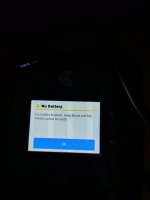
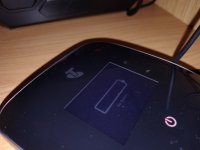
Well received my refurbished Netgear nighthawk m2, put my EE SIM in fired It up and It shows no battery etc. (see photo's) and can't get anything on my phone or TV. Used to get at least some signal on my old router (did have external aerial though) it works when plugged into a power source, but still no signal. Am I doing anything wrong 🤷.Overall a bit disappointed ☹️
 

Attachments

  • IMG_20251116_121514269_HDR.jpg
    IMG_20251116_121514269_HDR.jpg
    180.6 KB · Views: 84
  • IMG_20251116_124119477.jpg
    IMG_20251116_124119477.jpg
    224.3 KB · Views: 78
Well received my refurbished Netgear nighthawk m2, put my EE SIM in fired It up and It shows no battery etc. (see photo's) and can't get anything on my phone or TV. Used to get at least some signal on my old router (did have external aerial though) it works when plugged into a power source, but still no signal. Am I doing anything wrong 🤷.Overall a bit disappointed ☹️
Can't help re the lack of signal. Do you get a good EE signal in the same location using a phone?
Re the battery, I would suggest that either it needs charging (AI suggests for at least 2 hours), or it was not refurbished, or they removed it when refurbishing the unit and forgot to replace it. Any clues in the user manual?
 
Does this work as well as a unit with a roof mounted aerial? Thanks
I have the Netgear M6 which is a 5g mobile router ( I believe the M2 is 4g) and I use a scancom unlimited SIM card (on the 3 network) I do not use the roof mounted antenna, as it’s 4g.

In Harrogate this weekend I was getting download speeds in excess of 160mbps. At Donington circuit I’ve seen speeds of over 240mbps regularly.

I use a 3 data sim simply because 3 have good coverage and my phone is on EE so on the occasions when 3 is slower than EE (seldom happens) I use the phone a s a router.

To answer your question yes it would work well with a roof mounted Ariel, BUT I’d test it without before spending money on an external Ariel.

The Nighthawks need some time to charge from empty, but use little power once running.
 
Can't help re the lack of signal. Do you get a good EE signal in the same location using a phone?
Re the battery, I would suggest that either it needs charging (AI suggests for at least 2 hours), or it was not refurbished, or they removed it when refurbishing the unit and forgot to replace it. Any clues in the user manual?
We're on smarty with the phones, but we did get enough signal on the old set up to watch you tube etc. on the phone and on the TV via the fire stick. Can't even get enough to use the tester app on my phone now. There's definitely a battery in it as I had to put it in myself and it's definitely in correctly as it'll only gomin one way. Been on charge over two 2 hours with the unit off and it still says no battery. In fact the display doesn't even show a battery state symbol. I've contacted the seller so see what they say. Knowing our luck we've got a dodgy one🙄
 
I have the Netgear M6 which is a 5g mobile router ( I believe the M2 is 4g) and I use a scancom unlimited SIM card (on the 3 network) I do not use the roof mounted antenna, as it’s 4g.

In Harrogate this weekend I was getting download speeds in excess of 160mbps. At Donington circuit I’ve seen speeds of over 240mbps regularly.

I use a 3 data sim simply because 3 have good coverage and my phone is on EE so on the occasions when 3 is slower than EE (seldom happens) I use the phone a s a router.

To answer your question yes it would work well with a roof mounted Ariel, BUT I’d test it without before spending money on an external Ariel.

The Nighthawks need some time to charge from empty, but use little power once running.
Do they have a indoor aerials that plug in them? If so do you think it'll be worth a try?
 
I’d charge the M2 and take it outside in the open do a speed test, if the download speed is good then I’d take it into the motorhome and run the speed test again, if it’s significantly slower then you the external Ariel.

If the outdoor speed test is slow, then do the same with your mobile phone (use the same speed test app) if both are slow and if both devises are on the same network you need to get another devise or sim on a different network.

If that shows a faster speed then swop the sim into the M2 if that’s slower it’s a network issue. If it’s faster then take it into the van and do the test again. If the result is the same you don’t need an external Ariel, if it’s slower then you do need an external Ariel. But you may need a sim on a different network (ie the same as the alternative sim you used)

The scancom sim I use is a prepaid sim, it’s quite expensive upfront but no on going cost till it expires, there’s lots of options but keep an eye on Amazon and you’ll get a 3 year sim with 32 months remaining at a fraction of the full price.

Just remember

1. Take everything else off the network before doing a speed test
2. sign into the router and change the network settings, the available speed is split between users on the network. (tip here make them the same as your home router and all your devises will swop between home WiFi and mobile WiFi without you needing to do anything)
 
Thank you Boris. That's blown my mind a bit but I think I get the gist of it. Wish me luck. Can't really do anything until next Friday now as I'm on shift until then from tomorrow ☹️
 
We have TVs at home, seldom watch myself. If I’m going to sit in the van and watch TV I’ll sell the van.
 

Users who viewed this discussion (Total:0)

Back
Top